


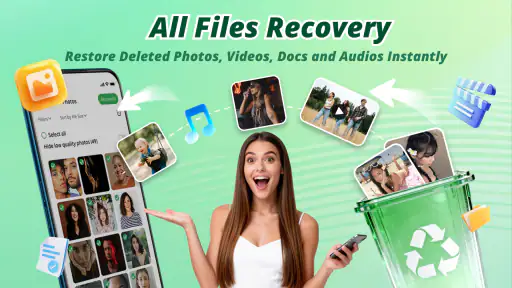
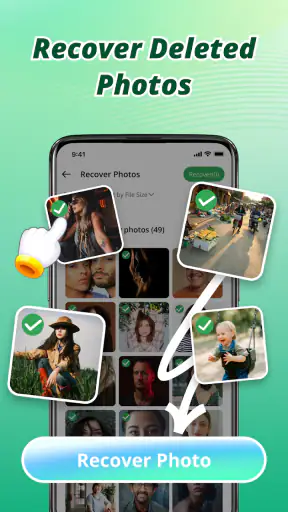




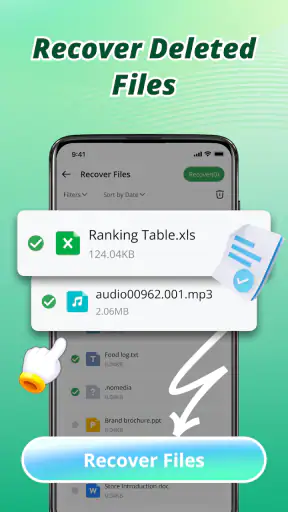

I tried Recovery Photo - File Restore as a productivity app for the moments when an important picture or file seems to have disappeared at the worst possible time. Its purpose is easy to understand: help users look for deleted photos and files instead of immediately giving up or paying for a more involved recovery service. That makes it appealing for everyday phone users, especially anyone who regularly saves family pictures, screenshots, documents, or downloaded attachments locally.
My first impression is that this is a focused utility rather than a complete file-management system. It is made by AbCdE, is free to use, and carries an Everyone age rating. The app has reached over one million installs and holds a 4.3 average from around seven thousand ratings, which suggests that many people find the basic recovery idea useful. Still, recovery tools need to be judged by more than popularity: the real question is whether the missing item is still recoverable on your particular phone and whether the app can make that process clear.
How Recovery Photo - File Restore fits into everyday recovery
A simple first stop after accidental deletion
When I delete a photo by mistake, my first instinct is usually to check the gallery’s trash or recently deleted area. That remains the sensible starting point because it is often the least complicated route. A recovery app becomes more useful when the item is not visible there, when I am unsure where it was stored, or when several folders contain similar versions of the same file.
This app is best understood as an extra search-and-restore option. The store summary presents it as a way to restore deleted photos and files easily, while the short description calls it “Recovery Photo.” Those phrases communicate the central job without suggesting that every deleted item can be brought back. In practice, deleted data can become harder to retrieve as a phone continues writing new information, so I would open the app soon after noticing the mistake rather than treating it as a guaranteed rescue service.
A realistic example is a document downloaded from a messaging conversation. I might remove it while cleaning the Downloads folder, then realize later that I need the attachment for a form. Instead of searching every folder manually, I would use this app as a focused attempt to locate a recoverable copy. If it finds several similar files, I would compare names, previews, and file locations before restoring anything, because the newest-looking result is not automatically the correct one.
What the free price means for the decision
The clearest value point is that the app is free. That makes it reasonable to try before considering paid recovery software or professional help. It also lowers the risk of downloading a tool simply to test whether a particular photo can be found. For a one-time accident, free access may be all a casual user needs.
Free does not mean every recovery attempt will succeed, and it does not remove the need for careful handling. I would not install it after deleting a file and then spend a long time browsing unrelated content before beginning the search. Every extra activity that creates new files can make the original data more difficult to recover. The useful value here is the chance to attempt recovery without an upfront purchase, not a promise that the app can reverse every deletion.
Because the app is free, I judge it mainly on clarity and usefulness rather than on how much money it saves compared with a paid product. A paid alternative may be preferable when it offers a clearly documented recovery method, deeper device support, or a workflow designed for professional situations. For ordinary personal photos and files, however, a free first attempt is a sensible proposition as long as expectations stay realistic.
Where it can save time
The strongest practical benefit is concentration. Instead of opening a file manager, checking multiple folders, searching cloud backups, and guessing which thumbnail belongs to the missing item, I can use a recovery-focused app as one part of the process. That is especially helpful when the deleted content had an unhelpful name, came from an app-generated folder, or was mixed with many temporary downloads.
I also like the idea of using it after checking the obvious locations rather than before them. The gallery recycle bin, cloud photo backup, messaging conversation, and computer backup can each preserve a clean original. If one of those sources contains the item, restoring from there is usually easier than relying on a recovery scan. Recovery Photo - File Restore earns its place when those normal paths do not immediately help.
Another useful workflow is to restore only what I recognize. If the app presents multiple candidates, I would avoid selecting everything at once. A smaller, deliberate restoration reduces clutter and makes it easier to confirm that the recovered file opens correctly. This matters with photos that have similar thumbnails or documents whose filenames have been shortened or changed.
The practical limits I would keep in mind
Recovery is not the same as browsing a recycle bin. The outcome can depend on how the phone handled the deletion, whether the storage area has been reused, and where the original file lived. A file removed from easily accessible device storage may be a different case from content held inside another app’s private area. I would therefore treat a successful result as possible, not automatic.
There is also a difference between finding a file and restoring a usable file. A thumbnail may look familiar while the underlying image is incomplete, or a document may appear in a result list but fail to open properly. After restoration, I would test the file immediately, check its resolution or contents, and copy it to a safer location. Keeping the only recovered copy in the same place where the deletion happened would defeat much of the benefit.
Users should also be patient with large collections. A phone containing years of photos and downloads can produce a crowded result set. I would narrow the search by approximate folder, file type, or time period whenever the app allows that kind of selection. If the interface presents everything together, sorting carefully becomes more important than speed. A recovery tool is useful only when the results can be understood.
How it compares with the usual alternatives
The closest alternative is the built-in recently deleted folder in a gallery or file manager. That option is usually better for recently removed items because it preserves the original context and often makes the restoration process straightforward. I would always check it first. Recovery Photo - File Restore becomes more interesting when the item is no longer visible there or when I need another way to search local storage.
Cloud backup is a stronger option when it was already enabled and had time to upload the original. It can preserve full-quality photos and provide a cleaner history than a recovery scan. The drawback is that a file may never have been backed up, may have been deleted from synchronized locations, or may be difficult to identify among many copies. This app is useful precisely in that gap, but it should complement backups rather than replace them.
Desktop recovery programs and specialist services may be better for irreplaceable business records, damaged storage, or cases where a phone has stopped behaving normally. They can involve more setup, technical knowledge, or expense. For a screenshot, casual photo, or downloaded document, I would try the free mobile option first. For evidence, financial records, or unique work files, I would avoid repeated experimentation and consider a more controlled recovery route.
Small habits that improve the recovery attempt
The most important tip is to stop unnecessary activity after deletion. I would avoid recording videos, downloading large files, installing several other utilities, or repeatedly clearing storage before trying to recover the missing item. Those actions can increase the chance that the space once occupied by the file is reused.
My second tip is to prepare a destination before restoring. If the app lets me choose where a recovered file goes, I would select a different, clearly named folder and then make a second copy elsewhere. That makes it easier to distinguish a restored result from the original search area. It also prevents a confusing cycle in which restored and still-missing files share the same folder.
A third tip is to verify the result before deleting anything else. I would open photos at full size, play recovered videos from beginning to end, and inspect documents page by page. A visible filename is not enough. This simple check can reveal partial recovery while there is still time to try another source, such as a backup or the original conversation.
Finally, I would use the app as a recovery tool, not as my regular storage strategy. Once the file is safe, I would organize it, back it up, and remove unnecessary duplicates. That approach gives the app a clear role: it helps with an accident, while a backup system protects against the next one.
Who will get the most value
I think this app suits Android users who want a low-cost first attempt after accidentally deleting personal media or ordinary files. It is particularly approachable for people who do not want to connect the phone to a computer or learn specialized recovery software. The Everyone rating also makes it a broadly accessible utility for general household use, although adults should still guide younger users through the difference between a preview and a successfully restored file.
It is less suitable for someone who expects a guaranteed, one-tap restoration of every deleted item. I would also be cautious about relying on it as the only plan for professional archives, legal material, or unique work projects. In those situations, a tested backup routine is more valuable, and a specialist tool may be the better choice if the data is genuinely critical.
The app’s current version is 1.7, and it requires Android 7.0 or newer. That requirement covers many still-used Android phones, but anyone with an older device should check compatibility before planning around it. I would also leave enough free storage for restored items and avoid restoring a large batch without checking where the files will be placed.
My final recommendation
After weighing the free access against the limits of deleted-file recovery, I see Recovery Photo - File Restore as a worthwhile first step, not a miracle solution. Its value comes from giving ordinary users another practical route when the gallery trash, file manager, or backup does not contain what they need. The app is most convincing when the missing item is recent, the phone is still functioning normally, and the user acts carefully after deletion.
I would recommend trying it for accidentally removed photos, screenshots, and downloaded files, especially when paying for a desktop utility would feel excessive. I would skip it as a substitute for backups or as the sole plan for irreplaceable data. In my view, the best decision is simple: check the built-in recovery and backup locations first, then use this free app promptly and selectively if the file is still missing. That makes its promise useful without asking it to do more than a mobile recovery tool reasonably can.
My bottom line: choose it when you want a free, focused recovery attempt on a compatible Android phone; choose a backup or specialist solution when certainty matters more than convenience.


